Workflow / Runbooks
Runbooks Into Live Sessions
Reusable command cards push directly into the active shell or pane instead of living in disconnected notes.
 Cerebra The CyberSecurity IDE
 Cerebra
A workplace that SEES what you want, Runbooks, AI, Graphs, Notes, and Analysis tools, plus AI-Cyber Mode where AI can SEE and CONTROL everything : RDP/SSH/Browser/Tools/..
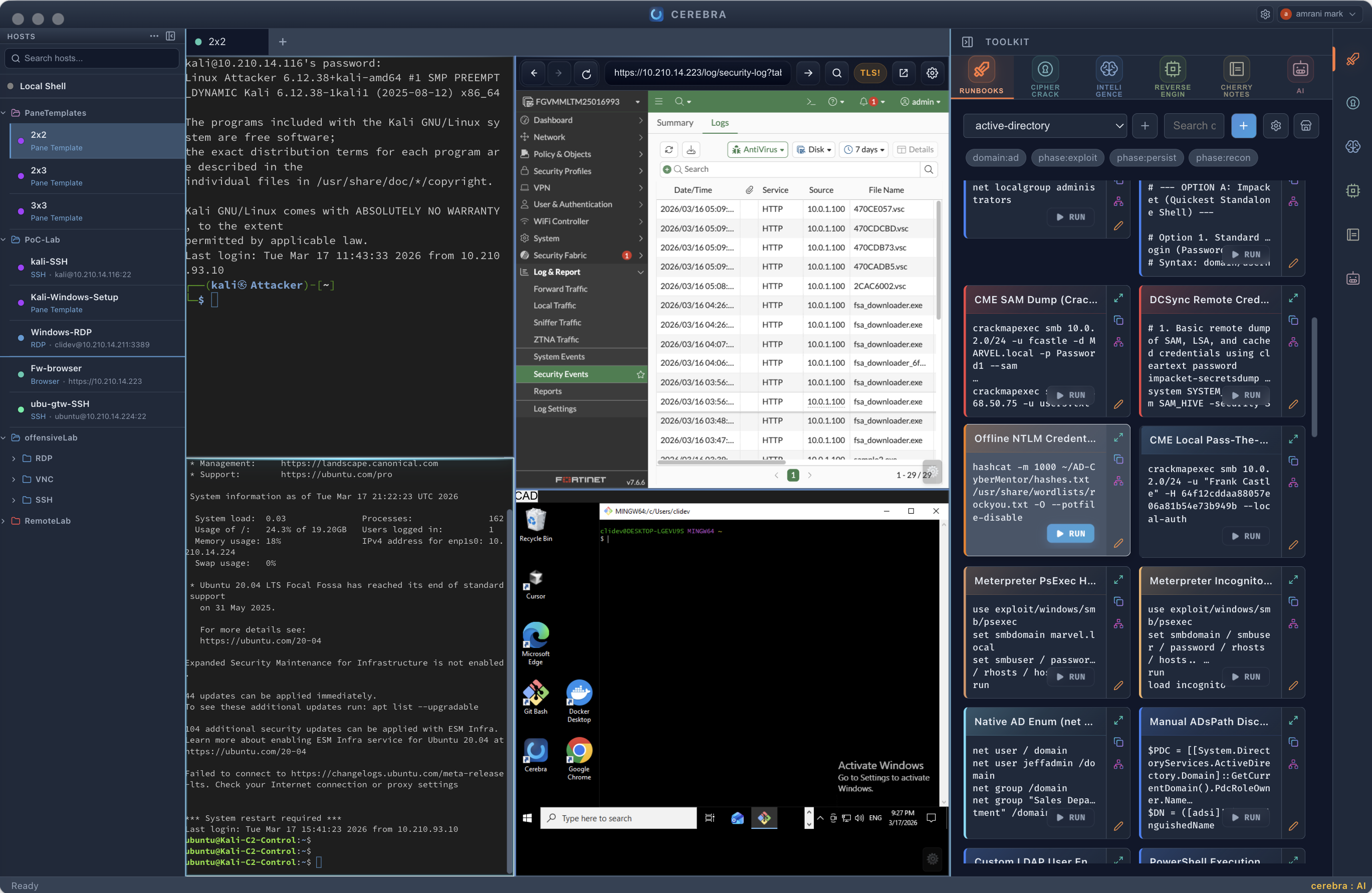
Split screen like a tmux master, save and reuse your dream templates
become super efficent, find what you need, and execute with one click
Everything you need in one place
Switch to magic AI-Cyber mode, AI can SEE and Control everything (RDP, Browser, SSH, Inteligence Tools, Pentesting, Graph building..)
Workflow + Analysis
Cerebra keeps execution, evidence, enrichment, and offline analysis in one workspace, so the workflow does not break every time the task changes.
Workflow / Runbooks
Reusable command cards push directly into the active shell or pane instead of living in disconnected notes.
Workflow / AI Toolkit
The AI Toolkit can reason over the current workspace instead of acting like a generic detached chatbot.
Workflow / CyberViewer
Attack-flow graphs stay connected to runbooks and previews so the app captures both action and structure.
Workflow / Notes
Evidence, screenshots, code blocks, and operator notes stay in the same app instead of fragmenting across tools.
Analysis / Intel
Enrich domains, URLs, IPs, and hashes from the same operator surface instead of pivoting into a pile of browser tabs.
Analysis / RevEng
Map suspicious APIs to ATT&CK, triage binaries, deobfuscate content, and extract IoCs in the same workspace that holds the live session.
Analysis / Crypto
Decode JWTs, hash payloads, convert formats, and run utility transforms without copying data into random web tools.
Protocols
Remote access and local shell work stay in one operator workspace instead of fragmenting across separate tools.
Protocol
Real PTY-backed terminal sessions with persistent tabs and split panes.
Protocol
Docker-backed preferred mode with native fallback when needed.
Protocol
Integrated noVNC workflow inside the same workspace shell.
Protocol
Quick local sessions for drafting, testing, and operator utility work.
Download
Pick the build for your platform. Status badges show whether a build is current, preview, or experimental, and each download includes its SHA-256 checksum.
macOS
Primary macOS release
Apple notarized
cddbd13a5e83c43180742f6df3a01fb8a66bd86617db7e5eee5589b0a2f2bc51 Windows Installer
Recommended signed Windows install path
Digitally signed by BlueZenith; SmartScreen reputation may still build
821aa305e78034e00affcb2d528dea5209e38f32d0ed5dc53699b8cd1515b808 Windows Portable
Portable signed Windows build
Digitally signed by BlueZenith; SmartScreen reputation may still build
a7ef6fec1bcfcc76315992da513d5bbb05230c1c0b574dca1cda321f705fca62 Windows Installer
Windows on ARM preview build
Unsigned preview build; SmartScreen warning expected
d517c7249931744117f0e36905769c0b2944a3fa893b44dff1ff651b0fcb6b5e Windows Portable
Portable Windows on ARM preview build
Unsigned preview build; reputation is not established
73b66b70d9827b8c7b34ff9078e8084c6a66cf3e17f343f439d0f56a0a90d72e Linux AppImage
x64 AppImage public channel
Experimental until distro matrix is complete
f3faa262e6892116021247a9c138652ef573e6b84c61d55d46959c598aeb5d3a Linux AppImage
ARM64 AppImage (Raspberry Pi, AWS Graviton)
Experimental until distro matrix is complete
bf5de43806ff0c2669ad051576101f289dc91a1f33fb680218a1d738d7d7460f